Stop Losing Tools with Asset Tags for 2–30 Truck Trade Shops
Trade tested asset tagging for 2–30 truck HVAC, plumbing, and electrical shops. Phone scannable QR workflows and offline capture for audit ready records.

Stop Losing Tools with Asset Tags for 2–30 Truck Trade Shops
Asset tags for equipment are digital records inside your field-service software, not stickers on a toolbox. Each tag pairs a unique ID with a live record showing who has the asset, where it went, and its service history. Start by serializing every major tool and vehicle, then enable QR or barcode scanning on the crew’s phones so a scan, not a text message, updates the record. Some field-service software options handle both pieces on the same mobile app your techs already use.
TL;DR:
- Tag high-value or frequently borrowed assets first to maximize tracking efficiency and reduce lost-tool costs.
- Ensure all key fields such as asset ID, serial number, current location, and maintenance dates are consistently recorded for quick, reliable reference.
- Use QR codes for most assets due to their low cost, fast scanning, and compatibility with smartphones, reserving RFID for high-value or bulky equipment.
- Regularly inspect and replace damaged tags during scheduled maintenance to maintain accurate asset records and prevent data gaps.
- Connect scanning to downstream processes like procurement, job invoicing, and inventory replenishment to streamline operations and cut administrative delays.
Table of Contents
- Why Digital Asset Tags Matter for Trade Contractors
- Equipment Record: Fields Every Tagged Asset Should Store
- Step-by-Step: Implementing Asset Tagging in Your Field-Service Software
- Connecting Asset Tags to Procurement, Dispatch, and Job Closeout
- Types of Physical Asset Tags and Where They Hold Up
- Best Practices for Physically Applying Asset Tags
- Barcode, QR Code, and RFID: Picking the Right Technology
- Maintenance and Replacement: Keeping Tags Readable Over Time
- Preventing Tag Tampering and Unauthorized Removal
- MEPflow’s Trade-Built Take on Equipment Tracking
- How MEPflow Handles Digital Asset Tags
- Sources
- FAQ
Why Digital Asset Tags Matter for Trade Contractors
Every plumbing, HVAC, or electrical shop running 2 to 30 trucks loses money the same way: a pipe threader disappears between jobs, a tech buys a duplicate crimper because nobody knew the shop already owned one, and invoicing stalls because no one can confirm which parts went on which job. None of that shows up on a P&L line labeled “lost equipment.” It just shows up as thinner margins.
Digital tags fix the custody problem directly. Each asset carries a record of who has it, which van it rides in, and which job it’s assigned to, so a tool going missing becomes a five-second lookup instead of a shop-wide search.
- Fewer duplicate purchases because the office can see what’s already on a truck
- Faster warranty and calibration reminders instead of missed service windows
- Quicker month-end audits, since movement history lives in one place
Contractors running spreadsheets, texts, and paper logs side by side deal with real time costs and blind spots on equipment location, according to industry analysis on disconnected systems. Connecting that data into one tracked system cuts the lost-tool costs and the administrative back-and-forth that eats into a Friday afternoon.
Pro Tip: Tag your highest-value, most-borrowed tools first. A $3,000 combustion analyzer that three techs share is worth tracking before you bother with hand tools.
Equipment Record: Fields Every Tagged Asset Should Store
A good equipment record answers three questions at a glance: what is this, where is it, and is it due for anything. Skimping on fields now means chasing down details later, usually during a warranty claim or an insurance audit.
Start with identifiers that never change: asset ID, serial number, and make and model. Add operational fields that shift week to week, like assigned technician, assigned van, current job, and status (in service, in repair, idle). Round it out with maintenance and compliance data: install date, warranty expiration, calibration due date, and a running service log noting parts fitted.
| Field category | Examples | Why it matters |
|---|---|---|
| Core identifiers | Asset ID, serial number, make/model | Confirms exactly which unit you’re looking at |
| Operational | Technician, van, job, status | Answers “where is it right now” |
| Compliance | Install date, warranty, calibration date | Prevents missed service windows |
| Trade specs | GPM, voltage/phase, BTU, kVA | Speeds up dispatch and job matching |
Trade-specific specs, like GPM on a pump, voltage and phase on a motor, or BTU rating on an air handler, belong as custom fields on the main asset record rather than buried in a parts list. Equipment records built for HVAC, electrical, and plumbing work typically include these fields precisely because dispatchers need them to match the right unit to the right job without calling the tech first, per trade-specific asset tracking guidance.
Pro Tip: Keep consumable parts, like filters or gaskets, in a separate parts list tied to the job. Mixing consumables into the equipment record just clutters the one place you need to check fast.
Step-by-Step: Implementing Asset Tagging in Your Field-Service Software
Rolling out asset tags works best as a phased project, not a weekend scramble. Here’s the order that avoids the most common stumbles.
- Scope your assets and define movement types. Decide what gets tagged (vehicles, power tools, specialty gear over a certain dollar value) and how movement gets logged: loaned to a tech, assigned to a van, or checked out to a job.
- Prepare your CSV before you import anything. Clean up serial numbers and model names first. Recommended columns to map: asset ID, serial, make, model, purchase date, assigned van, and current status. Best-practice guidance for field rollouts stresses mapping CSV imports into individual unit records rather than bulk-loading generic entries, according to field equipment tracking best practices.
- Set up your scanning workflow. Generate or host a QR code for each asset ID, then confirm the mobile scan flow takes fewer taps than sending a text. If a tech can text the office faster than they can scan, they’ll text the office.
- Pilot on one or two trucks first. Run it for two to three weeks before rolling out shop-wide. Keep the training script short: scan on handoff, scan on return, no exceptions.
- Validate with a first-month audit. Reconcile movement reports against what’s physically on each truck, then tune overdue alerts and thresholds based on what you actually see.
- Enforce a simple rule: no scan, no handoff logged
- Review the pilot data with the crew, not just the office
Pro Tip: If your two pilot trucks skip scanning within the first week, the workflow has too many steps. Cut it down before rolling it out to the rest of the fleet.
Connecting Asset Tags to Procurement, Dispatch, and Job Closeout
A tag that just sits in a database isn’t earning its keep. The real value shows up when a scan triggers something downstream, whether that’s a purchase order, a stock replenishment, or a closed-out invoice.
When a tech scans a part as consumed on a job, that consumption should feed directly into job costing and, if stock runs low, into a purchase requisition. Disconnected procurement, where techs call or text the office for parts, slows order accuracy and stretches billing timelines, according to reporting on procurement chaos in pipe and duct work. Connected systems close that gap.
- Van stock replenishment driven by what actually got scanned out, not guesswork
- Job closeout that automatically attaches parts and asset status to the invoice
- Monthly reconciliation reports flagging overdue returns and stalled movements
Run a simple reconciliation query once a month: pull every asset marked “checked out” for longer than 30 days and confirm it’s still on an active job. Anything unexplained is either lost or sitting idle in a truck nobody’s using.
Types of Physical Asset Tags and Where They Hold Up
Even though the record lives in your software, most shops still put a physical tag or QR sticker on the tool itself so a scan works without hunting for a serial number stamped somewhere obscure. The material you pick should match the environment the equipment actually lives in.
Polyester and vinyl labels work fine for indoor tools and van-stored equipment that doesn’t see much abrasion. They’re cheap and print clearly, but they degrade faster with UV exposure or repeated grease contact.
Anodized aluminum or metal photo tags hold up on rooftop condensers, boiler rooms, and anything exposed to weather or high heat for years at a stretch. They cost more per unit but rarely need replacing.
Polycarbonate or laminated tags split the difference: more durable than vinyl, cheaper than metal, and a common choice for pump rooms or electrical panels with moderate exposure.
Adhesive matters as much as material. Standard acrylic adhesive works indoors. Outdoor or high-temperature gear needs an industrial-grade adhesive rated for the surface temperature range the equipment reaches during operation, since a tag that peels off in July heat defeats the entire point of tagging it. Trade-focused resources on equipment identification practices cover label durability considerations worth checking before you order a batch.
Best Practices for Physically Applying Asset Tags
A tag applied poorly fails within a season, and then you’re back to guessing which unit is which. A few habits prevent that.
Clean the surface first. Grease, dust, or condensation on a condenser coil or a pipe fitting keeps adhesive from bonding properly, and a tag applied over grime will fall off within weeks. Wipe the spot down with isopropyl alcohol before applying anything.
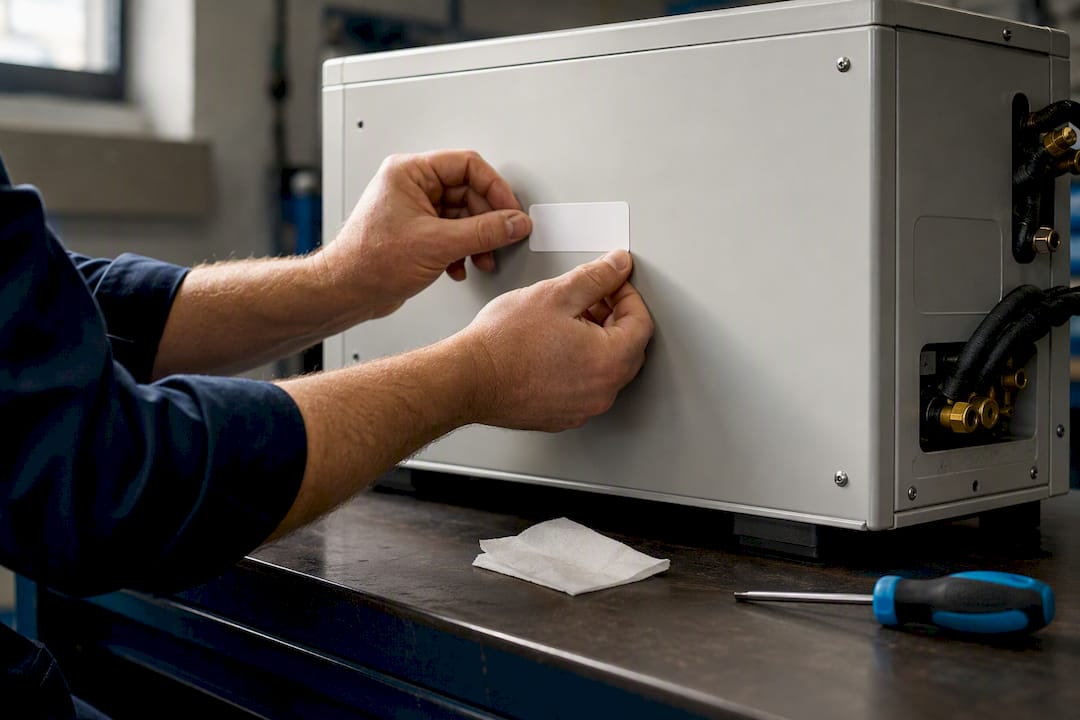
Place the tag somewhere visible but protected. On a rooftop unit, that usually means the side panel rather than the top, where sun and rain hit hardest. On a hand tool, the handle or a flat body surface works better than a curved edge where adhesive struggles to grip.
Avoid high-vibration surfaces when possible. A tag stuck directly to a compressor housing or a running motor takes more wear than one placed on an adjacent, more stable panel. If the asset itself vibrates constantly, a metal tag riveted or screwed on outlasts anything adhesive-based.
Give new adhesive time to cure, generally 24 hours, before the equipment goes back into heavy use or gets rained on. Rushing that step is the single most common reason a freshly tagged tool loses its label within the first month.
Finally, photograph the tag placement once it’s applied and attach that photo to the digital record. It’s a quick way to confirm during an audit that the physical tag still matches what the software says should be there.
Barcode, QR Code, and RFID: Picking the Right Technology
Three technologies dominate equipment tagging, and each fits a different budget and use case.
Barcodes are the cheapest option and print on almost any label stock. The tradeoff is a straight line-of-sight scan requirement and less data capacity, which matters less when the barcode is just a pointer to a fuller digital record anyway.
QR codes hold more data, scan faster at odd angles, and work well with a phone camera instead of a dedicated scanner gun. Field-equipment tracking guidance generally recommends QR over barcode for mobile-first crews specifically because the scan-to-record flow needs to happen in seconds, not after fumbling with a handheld reader, per field equipment tracking best practices.
RFID tags skip the line-of-sight requirement entirely. A reader can pick up a tag inside a toolbox or across a yard without anyone aiming a phone at it. That convenience comes at a real cost premium per tag and usually requires dedicated reader hardware, which is why most 2 to 30 truck shops stick with QR codes and reserve RFID for high-value fleets or yards tracking dozens of similar-looking units.
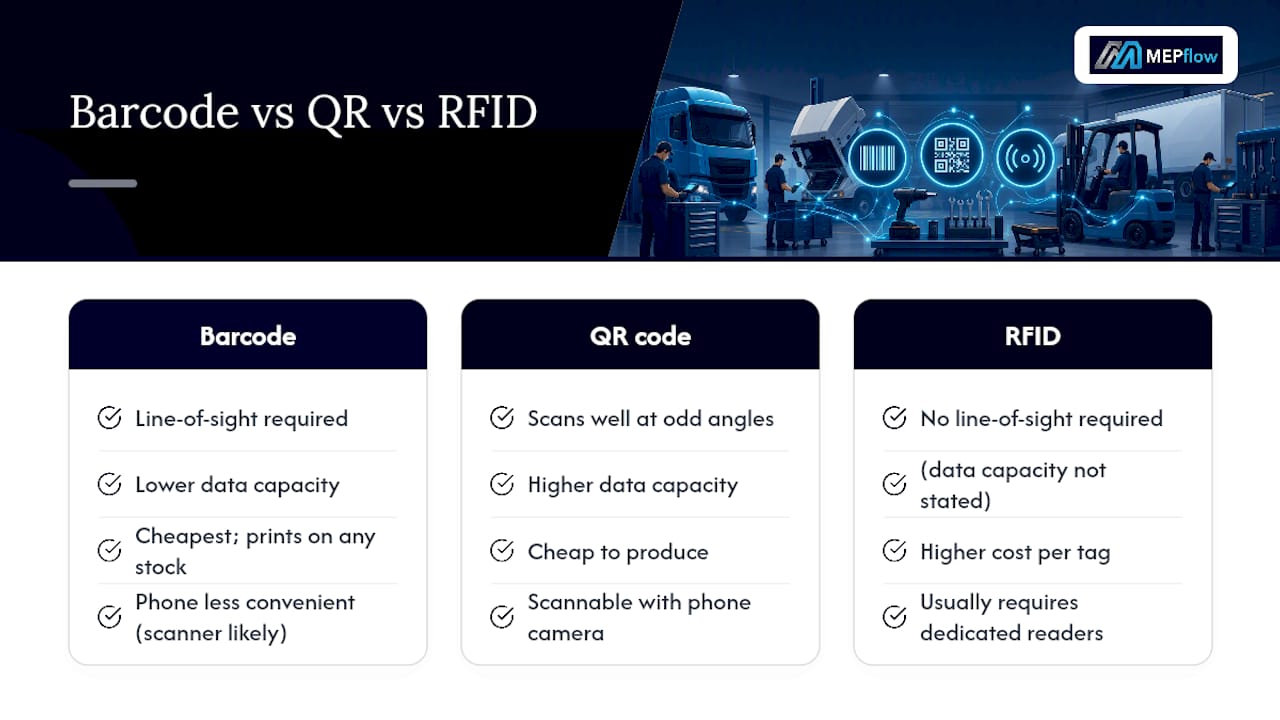
For most trade contractors, QR codes hit the sweet spot: cheap to produce, scannable with the phone already in a tech’s pocket, and flexible enough to encode a direct link into the asset record.
Maintenance and Replacement: Keeping Tags Readable Over Time
A tag is only useful as long as it’s readable, and equipment tends to outlive its first label by years. Building a replacement rhythm into your maintenance schedule avoids gaps where a tool sits untracked because nobody noticed the sticker peeled off.
Inspect tags during scheduled maintenance visits rather than as a separate task. If a technician is already servicing a rooftop unit or running a calibration check, checking the tag takes seconds and gets folded into work already happening.
Watch for the usual failure points: UV fading on outdoor gear after a couple of summers, adhesive lifting at the corners on anything handled roughly, and print rubbing off on tools that get tossed into a bin repeatedly. Metal tags rarely need replacing, but their mounting hardware can loosen over years of vibration, so a quick check that the tag is still attached matters as much as checking it’s still legible.
When a tag does need replacing, keep the same asset ID rather than generating a new one. A fresh ID breaks the movement history and service log tied to that record, which defeats the purpose of tracking the asset in the first place. Print a replacement tag with the identical code and log the swap date in the service notes so anyone auditing later understands why there’s a new sticker on an old machine.
Preventing Tag Tampering and Unauthorized Removal
Tags occasionally get peeled off, swapped between similar-looking units, or scratched illegible on purpose when a tech doesn’t want a tool traced back to them. It’s not common, but it happens often enough to plan around.
Placement helps more than any technology fix. A tag mounted where removing it would damage the surface or void a warranty sticker discourages casual tampering. Tamper-evident label stock, which leaves a visible residue pattern or “VOID” text if peeled, works well for higher-value gear.
Cross-reference the physical tag against the serial number stamped by the manufacturer whenever you’re doing a full audit. If a tag says one thing and the stamped serial says another, that’s a flag worth investigating immediately rather than assuming a data entry error.
The stronger safeguard is procedural, not physical: enforce scan-on-handoff as a non-negotiable habit. If every custody change requires a scan, an asset that goes missing shows up in the movement history at the last confirmed checkpoint, which narrows the search dramatically even if the tag itself gets damaged or removed later.
MEPflow’s Trade-Built Take on Equipment Tracking
Some software solutions in the field-service space are built by tradespeople who test the software in the field before releasing new features. That matters for asset tagging specifically, because a scanning workflow that looks fine on a laptop often falls apart on a rooftop with no signal or in a basement crawlspace where a phone can barely find a cell tower.
Offline-capable mobile capture isn’t a nice-to-have for that reason. Field-first tools that support offline scanning and hosted QR links see better adoption specifically because techs working in poor-connectivity spots need to log a scan the moment it happens, not after they climb back down to a spot with signal, a pattern seen across HVAC-specific tracking platforms. Software built by people who’ve stood in that crawlspace tends to design for that reality first, rather than treating it as an edge case.
— Jonathan
How MEPflow Handles Digital Asset Tags
Certain field-service software supports mobile-first scanning that works from the truck, equipment records with custom fields for trade specs, parts tracking tied to jobs, and offline capture that syncs when signal returns. These systems run on the same data whether accessed in the office on desktop or in the field on a phone.

If you’re running a 2 to 30 truck plumbing, HVAC, or electrical shop and still tracking equipment through texts and spreadsheets, start small. Pilot asset tagging on one or two trucks using the steps outlined above, then expand once the workflow sticks. MEPflow’s equipment tracking tools are built into the same app your crew already uses for scheduling and invoicing, so there’s no separate system to maintain. Pricing depends on crew size, with every feature included on every plan. Check current details at MEPflow’s pricing page. Free signup covers up to 5 customers without trade tools, so if you want the full 14-day trial with equipment tracking included, call 866-808-4996 to get it booked. Ready to move forward? Create your company account and start serializing your fleet this week.
Sources
For deeper technical grounding, ASHRAE’s 1801 data exchange protocols offer standardized equipment schemas useful for CMMS import. The Mechanical Contractors Association of America publishes practical guidance on equipment cost control and maintenance programs worth reviewing before building your own record templates.
FAQ
What Is an Asset Tag in Field-Service Software?
It’s a digital record tied to a unique ID that tracks who has a piece of equipment, where it is, and its service history. Unlike a physical label alone, the tag connects to job assignment, warranty dates, and maintenance schedules inside the software.
Do I Need RFID, or Is a QR Code Enough?
QR codes cover most contractor needs since they scan quickly with a phone camera and cost far less than RFID hardware. RFID makes more sense for larger fleets tracking dozens of visually similar units where line-of-sight scanning slows things down.
How Do I Import My Existing Equipment List?
Clean up your spreadsheet first, standardizing serial numbers and model names, then map columns like asset ID, serial, make, model, and assigned van into individual unit records rather than bulk entries. Following field equipment tracking best practices during import prevents duplicate or malformed records later.
Does MEPflow Support Offline Scanning?
Yes, MEPflow’s mobile app captures scans, photos, and status updates offline, syncing everything once signal returns. That matters for rooftop and basement work where connectivity is unreliable.
How Often Should I Replace a Damaged Asset Tag?
Replace a tag as soon as it becomes unreadable or starts peeling, and inspect tags during regular maintenance visits so the check doesn’t require a separate trip. Always keep the same asset ID on the replacement tag to preserve the equipment’s movement and service history.
Where to next
- See what MEPflow doesScheduling, estimates, dispatch, invoicing and job costing in one app.
- Create your company accountSet your shop up in a few minutes. No card to start.
- How to Reduce Field Service Scheduling TimeMore from the MEPflow blog
- Cut No Shows 25%: Text Appointment Reminders for Service ShopsMore from the MEPflow blog