Invoice Payment Links for Contractors: Get Paid in Days, Not Weeks
Collect payments from the job site with mobile, audit ready invoice payment links. Speed deposits to days instead of weeks, secure records for IRS and FTC...
Invoice Payment Links for Contractors: Get Paid in Days, Not Weeks
An invoice payment link is a secure URL that lets a customer view an invoice and pay it instantly by card, ACH, or digital wallet, without mailing a check or calling in a card number. For plumbing, HVAC, and electrical contractors, the payoff is straightforward: money moves from job-complete to bank-deposited in days instead of weeks, and reconciliation happens automatically instead of by hand. Getting there right means following IRS recordkeeping rules, using TLS-secured payment pages, and, for many shops, running the whole thing through an integrated platform like MEPflow.
TL;DR:
- Payment links should be created from correct invoice data, including accurate tax lines and enabled payment methods, to prevent support calls or failed transactions.
- Card payments process quickly within one or two days but have higher fees and dispute risk, while ACH transfers cost less but settle in several days, influencing your choice for large versus small invoices.
- Secure payment pages must use TLS encryption, hosted checkout forms, and email authentication to ensure compliance, security, and avoid fraud risks.
- Sending payment links immediately after job completion and including a visible pay-now button at the top of invoices significantly shortens collection cycles.
- Integration with accounting software, offline capability, and support for text-to-pay are key factors when selecting invoicing platforms that streamline reconciliation and speed up cash flow.
Table of Contents
- What Is an Invoice Payment Link and Where Does It Fit in Your Workflow?
- How to Create and Send an Invoice Payment Link, Step by Step
- Which Payment Methods Should You Offer on a Link?
- Security, Compliance, and Recordkeeping: Staying Audit-Ready
- Best Practices That Actually Speed Up Payment
- How to Choose the Right Payment-Link Workflow for Your Shop
- Mobile-first matters on a real job because it lets a technician accept an estimate on the phone, generate the invoice on site, text the payment link before leaving the driveway, and have the payment reconcile automatically, even if the job started somewhere with no signal.
- What I’d Actually Test First
- Get Paid Without Leaving the Job Site
- Where This Guidance Comes From
- Sources
- FAQ
What Is an Invoice Payment Link and Where Does It Fit in Your Workflow?
An invoice and a payment link solve different problems. The invoice is the record: line items, tax, total due, terms. The payment link is the action: a clickable button or URL that takes the payer straight to a hosted checkout page tied to that specific invoice. You can have one without the other, but pairing them is what actually gets you paid.
The typical flow looks like this: you finish the job, generate the invoice, attach or embed a payment link, send it, the customer clicks and pays, and the payment posts back against that invoice automatically. No separate terminal swipe, no manual entry into your books later that night.
Contractors use these links in a few recurring ways:
- Texting a “pay now” link the moment a technician closes out a work order
- Printing a QR code on the signed job sheet so the customer can scan and pay before the truck leaves the driveway
- Emailing a follow-up link three or five days after an unpaid invoice, with no phone call required
Each scenario collapses what used to be a multi-step chase into one tap.
How to Create and Send an Invoice Payment Link, Step by Step
Before you generate anything, confirm four things are correct: the customer record (name, address, email or phone), the invoice number, the itemized charges and tax, and which payment methods you’ve enabled (card, ACH, wallet). A link built on a wrong invoice number or missing tax line just creates a support call later.
- Generate the link or QR code from your invoicing tool, tied to the specific invoice.
- Choose one-time or reusable. One-time links close after payment, which is right for most single jobs. Reusable links suit recurring maintenance contracts.
- Enable partial payments or deposits if the job requires a down payment before parts arrive or a balance due on completion.
- Set the due date and terms so the payment page displays them, not just your invoice PDF.
- Send it by email with a visible pay-now button, by SMS as a text-to-pay link, or as a QR code on the signed job order for on-site payment.
- Capture payer name and issue a receipt automatically so you have a paper trail matching the payer to the invoice, not just a bank deposit with no name attached.
Common problems are predictable. Expired links usually mean the invoice date rolled past a set window, so reissue rather than resend the same URL. Failed payments are often a typo in card details or an ACH account number, not a system fault. Duplicate payments happen when a customer pays by check and clicks the link. Build the habit of checking your accounts-receivable ledger before sending a reminder.
Pro Tip: Keep one invoice-numbering scheme across every job, even across trades, so a payment link never gets attached to the wrong customer file when someone’s paying from a phone with a cracked screen and fat fingers.
Which Payment Methods Should You Offer on a Link?
Card payments settle fast, usually within one to two business days, but carry higher processing fees and more dispute exposure if a customer contests a charge after the fact. ACH (bank transfer) costs less per transaction and works well for larger invoices, but settlement can take several business days, which matters if you’re covering payroll off that job.
Digital wallets like Apple Pay or Google Pay ride on the same card rails but speed up checkout on a phone, which matters when your customer is standing on their porch.
A few practical trade-offs to weigh:
- Enable ACH for large invoices where the fee percentage matters more than speed
- Keep card and wallet options on for smaller service calls where speed of collection outweighs the fee
- Recurring maintenance plans need a reusable link or stored payment method, which changes how you reconcile deposits against future invoices
Partial payments and deposits require your bookkeeping to track a balance, not just a paid/unpaid flag.
Security, Compliance, and Recordkeeping: Staying Audit-Ready
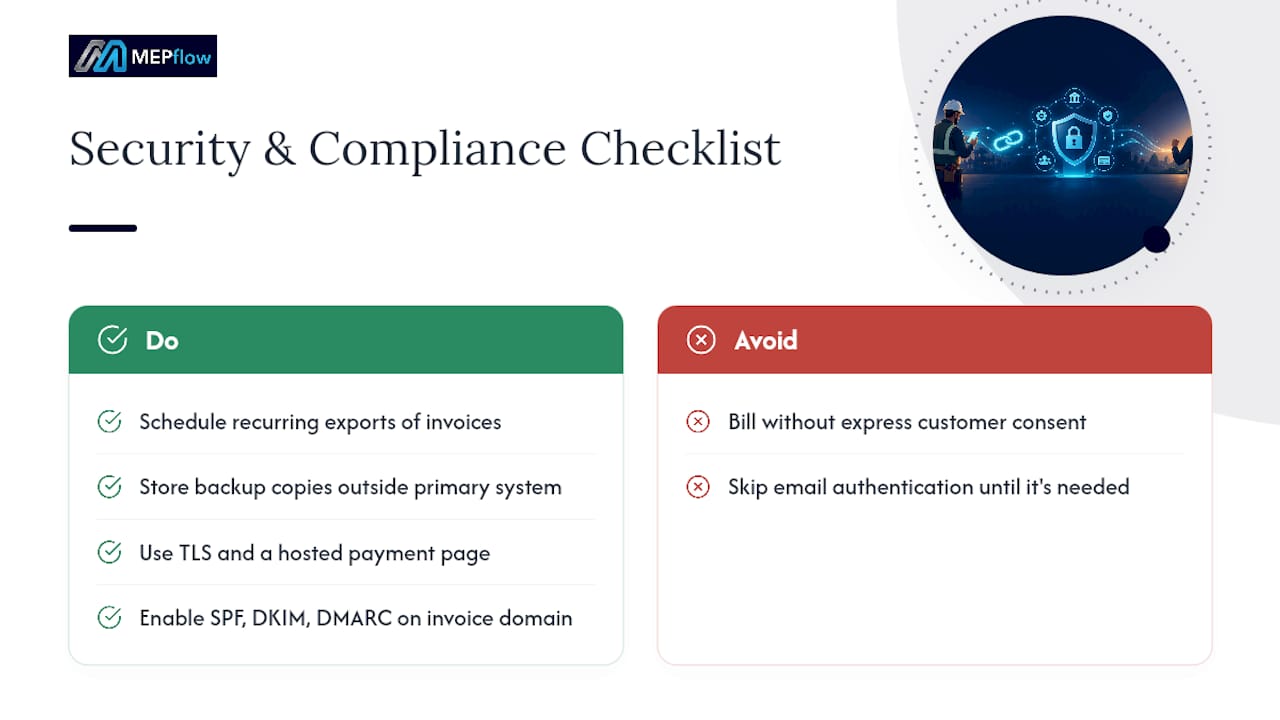
The IRS treats electronic records the same as paper ones. That means your invoice and payment data has to be complete, accurate, and accessible if you’re ever asked to produce it, per the Internal Revenue Manual’s recordkeeping requirements. During an examination, the IRS can request electronic accounting software backup files and, in some cases, administrator-level access to pull records directly, according to its guidance on electronic accounting software records. Schedule a recurring export of invoices, payments, and receipts, and store a copy somewhere outside your primary system.
On the billing side, the FTC requires that electronic charges be authorized by the customer, and it explicitly warns against billing without express consent, especially for anything recurring, in its payments and billing guidance.
Technically, a payment link needs three things running quietly in the background: TLS encryption on the checkout page, so card and bank data travel encrypted; a secure hosted payment page rather than a raw form; and email authentication (SPF, DKIM, DMARC) on the domain sending invoices, so a scammer can’t spoof your business name and send a fake “pay now” link to your own customers. That last one is the fix most shops skip until it costs them a customer’s trust.
Best Practices That Actually Speed Up Payment
Small changes to how an invoice looks and when it arrives move payment dates more than most contractors expect.
- Put a visible pay-now button at the top of the invoice, not buried below the line items
- List the due date in plain text, not just a payment-terms code
- Itemize charges so the customer isn’t guessing what a lump sum covers
- Send the link the moment the job is marked complete, while the customer is still standing there
- Follow with one SMS reminder a few days later, and stop at one or two automated nudges
Automating accounts receivable, including payment links and scheduled reminders, measurably shortens collection cycles and reduces the manual chasing that eats an office manager’s week, according to a PYMNTS and American Express tracker on AR automation.
Pro Tip: Reconcile deposits to invoices weekly, not monthly. A month-old mismatch is a mystery. A week-old one is a five-minute fix.
How to Choose the Right Payment-Link Workflow for Your Shop
Not every invoicing tool handles a service business the same way. Before you commit, run through this checklist:
- Does it sync with your accounting software so a paid link posts automatically instead of requiring manual entry?
- Does it work offline? A crew in a basement or a rural job site with no signal still needs to generate and queue a link.
- Can you export records on demand for tax or audit purposes, matching what the IRS expects for accessible electronic records?
- Does it support text-to-pay, or only email, given how many customers pay faster from a phone?
- Can a technician send the link from the field, or does it require someone back at the office?
Watch for red flags when a payment processor pitches you: long equipment leases, vague fee schedules, or pressure to sign before you’ve read the contract are classic warning signs the FTC has flagged in its guidance on processing deals. If you’re juggling separate invoicing and payment tools today, an integrated field-service platform usually wins on fewer reconciliation errors alone.
Mobile-first matters on a real job because it lets a technician accept an estimate on the phone, generate the invoice on site, text the payment link before leaving the driveway, and have the payment reconcile automatically, even if the job started somewhere with no signal.
What I’d Actually Test First
Pick one thing: turn on text-to-pay for your next few urgent service calls and time how fast payment lands compared to your usual invoice-and-wait cycle. Reconcile weekly, export backups monthly, and get SPF, DKIM, and DMARC set up on your sending domain before a scammer forces the issue for you.
— Jonathan
Get Paid Without Leaving the Job Site
Most contractors juggle separate tools for invoicing, payments, and bookkeeping, then spend Friday afternoons trying to make the numbers match. MEPflow builds invoicing with instant payment links directly into the same platform your crew already uses for scheduling and job costing, so a link sent from a phone reconciles against QuickBooks without anyone re-typing a thing.
It’s mobile-first and works offline, meaning a technician in a basement with no signal can still generate an invoice and queue the payment link to send the moment coverage returns. Every plan includes the same features, from the pricebook to the payment links, so you’re never told a capability is locked behind a higher tier. If you want to see it running before committing, call 866-808-4996 to book a 14-day trial, or create your company account and see the invoicing and payments side for yourself. Full plan details are on the MEPflow pricing page.
If you need a quick standalone invoice template while you’re weighing options, a free invoice generator can get a PDF out the door in the meantime.
Where This Guidance Comes From
The recordkeeping and audit-readiness advice in this article draws directly from the IRS’s recordkeeping requirements and its guidance on electronic accounting software records. Billing authorization and consent rules come from the FTC’s payments and billing guidance, and the case for automating collections is backed by PYMNTS and American Express’s AR automation research.
Sources
- Internal Revenue Manual (IRM) — Recordkeeping requirements
- Payments and billing | Federal Trade Commission
FAQ
How Do I Make a Payment Link for an Invoice?
Generate it from your invoicing or field-service software by selecting the invoice and choosing “create payment link” or a similar option. The link ties directly to that invoice’s amount and details, so no manual entry is needed once the customer pays.
Is a Payment Link a Legitimate Way to Collect Money?
Yes, when it runs through a secure, TLS-encrypted checkout page from a recognized invoicing or payment platform. Confirm the sender’s email domain matches your contractor and that the URL leads to a hosted payment page, not a redirect to an unfamiliar site.
What’s the Difference Between an Invoice and a Payment Link?
An invoice is the billing document listing what’s owed and to whom. A payment link is the clickable URL that lets the customer pay that invoice instantly, often embedded as a button inside the invoice itself.
Can I Generate a Payment Link Without Special Software?
You need some kind of invoicing or payment platform to generate one, since the link has to connect to a secure checkout page and post the payment back to your records. Field-service platforms like MEPflow generate the link automatically as part of creating the invoice, with no separate payment app required.
What Should I Do if a Customer Says a Payment Link Failed?
Check first whether the link expired or whether the card or ACH details were entered incorrectly, since both are far more common than a system outage. Reissue a fresh link tied to the same invoice number rather than editing the old one, so your records stay clean.
Where to next
- See what MEPflow doesScheduling, estimates, dispatch, invoicing and job costing in one app.
- Create your company accountSet your shop up in a few minutes. No card to start.
- How to Reduce Field Service Scheduling TimeMore from the MEPflow blog
- Cut No Shows 25%: Text Appointment Reminders for Service ShopsMore from the MEPflow blog