4 Copy Ready On Call Rotation Schedule Templates for IT and Ops
Copy ready on call rotation templates for IT ops teams, including 5 minute escalation and 2 minute handoffs. Ready to implement this week.

4 Copy Ready On Call Rotation Schedule Templates for IT and Ops
An on-call rotation schedule assigns primary and backup responders for each shift, with clear escalation rules if nobody answers. For most teams of four to eight people, a weekly rotation with a named primary and backup, plus a five-minute no-response escalation rule, is the simplest setup that actually holds up at 2 a.m. Skip to the templates section below if you just need something to copy today.
TL;DR:
- Teams of four to eight should use weekly rotations with clear escalation rules, and always include contact numbers and handoff times in the schedule.
- Escalation rules must specify a five-minute no-response window for primary, backup, and manager notifications, with written rules visible in schedules.
- Rotate staffing based on alert volume and team size, using shifts of 8 to 12 hours for high-alert services to prevent fatigue and poor decision-making.
- Schedule start times should be explicit and timezone-aware, with swaps and overrides clearly distinguished for planned versus emergency changes.
- Conduct regular review of on-call fairness, adjusting team size, shift length, or escalation timing based on collected data and team feedback.
Table of Contents
- What Is an On-Call Rotation Schedule?
- Common Rotation Patterns and When to Use Each
- Designing a Rotation That Doesn’t Burn People Out
- Getting the Scheduling Mechanics Right
- Templates You Can Copy Today
- How to Keep On-Call Sustainable Over Time
- A Practitioner’s Note on Handoffs
- How MEPflow Fits Into Your On-Call Rotation
- Sources
- FAQ
What Is an On-Call Rotation Schedule?
An on-call rotation schedule names who responds when something breaks, and when their responsibility starts and ends. The primary is the first responder. The secondary (or backup) picks up if the primary misses an alert. Escalation is the chain that fires when nobody answers, usually landing on a manager after both responders have been paged. Rotation start is the exact timestamp a shift begins, and handoff time is when outgoing and incoming responders exchange context.
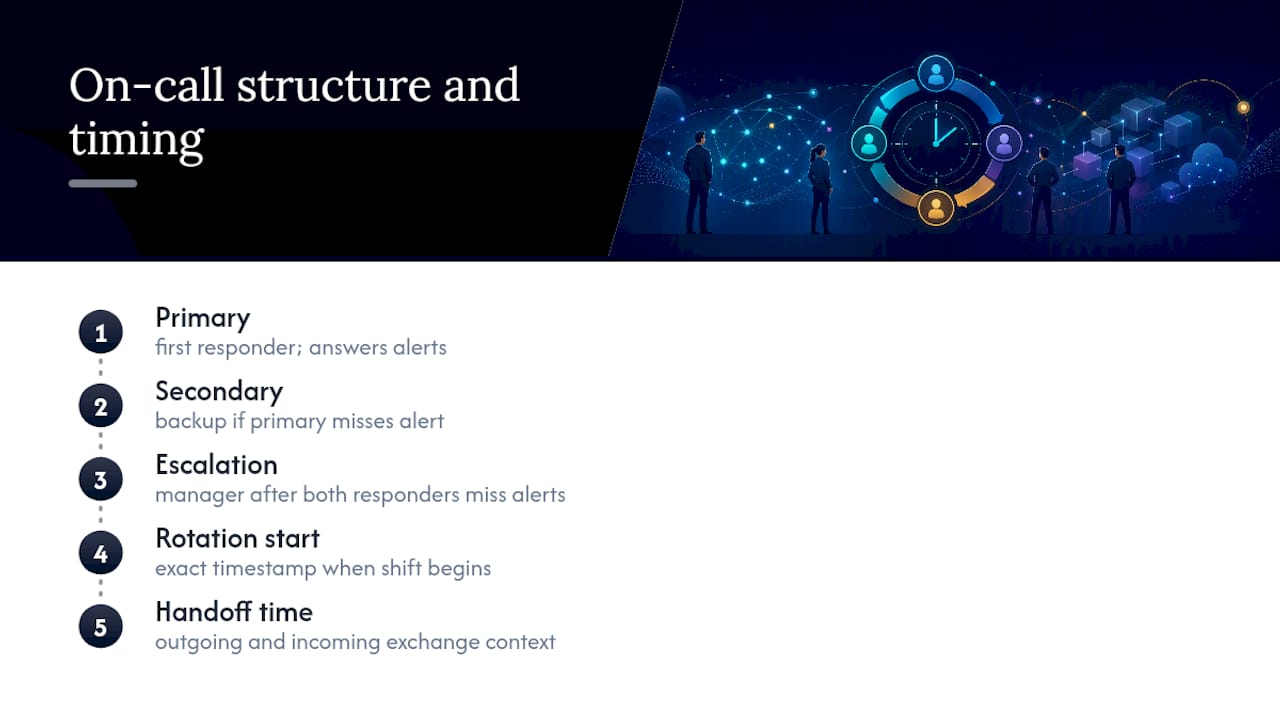
Skipping any of these creates a single point of failure. A schedule row needs, at minimum: date, primary name and phone number, secondary name and phone number, the service or system covered, and the handoff time. Miss the phone number column and you’ve built a schedule nobody can actually use during an outage.
Common Rotation Patterns and When to Use Each
Most teams pick from five patterns, and the right one depends on team size, alert volume, and how spread out your people are geographically.
- Weekly rotation — one person carries the pager for seven days. Works well for teams of four to eight with moderate alert volume; fewer handoffs mean less risk of dropped context, but a bad week hits one person hard.
- Daily rotation — responsibility flips every 24 hours. Good for high alert volume where a full week would burn someone out, though it means more frequent handoffs and more chances for something to slip through the cracks.
- Biweekly rotation — stretches the weekly model to two weeks. Only works for very low alert volume teams who rarely get paged.
- Follow-the-sun — coverage passes between teams in different time zones so nobody works overnight. Requires at least two geographically distributed teams and adds coordination overhead, but eliminates the worst part of on-call: 3 a.m. pages.
- Layered primary and secondary — a dedicated backup shadows every shift regardless of pattern. Atlassian’s on-call guidance recommends this layering specifically because it lets teams tailor coverage to actual alert patterns rather than forcing everyone into the same shift length.
The tradeoff across all five comes down to handoff frequency versus fatigue. More frequent rotations spread the burden thinner but multiply the moments where information can get lost between people.
Designing a Rotation That Doesn’t Burn People Out
Team size determines almost everything else about a healthy rotation. Datadog’s engineering team recommends six to eight people per rotation so each person serves on-call roughly once a month, and treats four people as the practical floor for a weekly schedule, since anything smaller pushes someone onto call every three or four weeks without a break.
Shift length matters just as much. Eight to twelve hour shifts work better than 24-hour shifts for high-alert-volume services, because a responder who’s been up for 20 hours straight makes worse decisions than one three hours into a shift. Reserve full 24-hour shifts for low-noise systems where pages are rare.
Escalation timing needs to be explicit and written down, not assumed:
- Primary gets paged first.
- No response within 5 minutes triggers a page to the backup, a rule practitioner guides consistently recommend to avoid dead air during an active incident.
- No response from backup within another set window escalates to the on-call manager.
- Every handoff includes contact numbers, current service ownership, and a written note on anything unresolved.
Pro Tip: Write the no-response window into the schedule document itself, not just into your paging tool’s config. When someone’s onboarding onto the rotation, they need to see the rule, not just experience it during a live incident.
Getting the Scheduling Mechanics Right
Two settings cause more on-call disasters than anything else: an unclear rotation start time and a tool that doesn’t understand time zones. Set an explicit rotation_start timestamp for every rotation, not a vague “Mondays.” Grafana’s scheduling documentation notes that schedules should be evaluated at execution time and tested for timezone-aware behavior, since a rotation that looks correct in one time zone can hand off at the wrong hour in another.
Swaps and overrides serve different purposes, and mixing them up causes confusion:
- Use swaps for planned changes, like trading shifts around a vacation, tracked in advance so the schedule stays accurate.
- Use overrides for emergencies, like someone getting sick mid-shift, applied on top of the existing schedule without erasing the original plan.
- If your team spans time zones, layer follow-the-sun coverage during business hours and keep a limited backup rotation for overnight gaps rather than asking one region to cover around the clock.
A spreadsheet works fine until you need automated escalation, audit timestamps on every change, or calendar export in iCal or CSV format. Once any of those become a real requirement, that’s the signal to move to dedicated scheduling software.
Templates You Can Copy Today
Four patterns cover most teams. Each needs the same core columns: date, primary contact, secondary contact, service name, handoff time, and a link to the relevant runbook, a structure that template guidance from scheduling resources consistently points to as the minimum for preventing coverage gaps.
- Weekly primary + backup: one row per week, Monday 9 a.m. handoff, primary and secondary named for the full seven days.
- 12-hour day/night split: two rows per day, handoffs at 8 a.m. and 8 p.m., separate contact numbers for day and night responders.
- Follow-the-sun layered: one row per region per business-hours block, with a single overnight backup layered across all regions.
- Small-team alternating days: one row per day, primary rotates daily among three or four people, no dedicated secondary since the pool is small.
Before any of these go live, run a quick validation pass: confirm every contact number is current, every handoff time is stated in a single agreed time zone, and every row has a working runbook link. A schedule with a broken link is worse than no schedule at all, because it creates false confidence.
How to Keep On-Call Sustainable Over Time
Fairness erodes quietly. Track weekend and holiday carries separately from regular weekday shifts, since two people can serve the same number of total days a month and still have wildly different experiences of it. Watch pages per shift and acknowledgement times too. A shift with fifteen pages is not the same job as one with two, even if both count as “a week on-call” on paper.
- Cap consecutive on-call days and build in comp time or shift relief afterward.
- Rotate weekend and holiday coverage explicitly rather than letting it fall on whoever happens to be up.
- Review the numbers monthly or quarterly and adjust team size, shift length, or escalation timing based on what the data actually shows.
- Ask the team directly whether the current pattern still fits their schedule.
A rotation that looked fair when the team had four people can quietly become unfair once alert volume triples. The fix isn’t more heroics from whoever’s on call. It’s reviewing the numbers and changing the pattern.
A Practitioner’s Note on Handoffs
The single biggest failure in on-call rotations isn’t a bad escalation rule. It’s the handoff that never happened, where the outgoing responder assumes the incoming one already knows about that flaky database connection. A two-minute written handoff, posted publicly and confirmed by the incoming responder, fixes most of that. If your team does nothing else this month, start there.
— Jonathan
How MEPflow Fits Into Your On-Call Rotation
Mepflow is built for the moment your on-call rotation moves from a document into the field, where connectivity often disappears right when you need it most. Its scheduling tools distribute rotation assignments to the crew directly, its offline mode keeps that schedule readable in basements and rural job sites with no signal, and its live crew and equipment tracking tells a dispatcher exactly who’s closest to the next emergency call.
For MEP businesses, the handoff moment matters as much as the schedule itself. A technician wrapping an after-hours call can log job notes and photos directly in Mepflow, so the next responder inherits real context instead of a text message that got lost overnight. Customer texting and arrival notifications close the loop on the client side too, so nobody’s waiting in the dark wondering who’s coming. Every plan includes the full feature set, no add-on tiers to negotiate, and no contracts locking you in. If your rotation runs on a spreadsheet and a group text right now, see how Mepflow’s scheduling tools work and check whether it fits your crew size today.
Sources
Datadog’s on-call structure guide covers team-size math in detail. Atlassian’s scheduling guidance explains swap and override policy. PagerDuty’s schedule examples show layered rotations in practice, and the on-call template guide breaks down required schedule columns.
- How we structure on-call rotations at Datadog
- A better approach to on-call scheduling
- On-Call Rotation Guide: Schedule Templates, Handoffs & Examples
- On-call schedule template guidance
FAQ
What Is a Rotating On-Call Schedule?
A rotating on-call schedule cycles responsibility for handling alerts among team members on a set interval, whether that’s daily, weekly, or biweekly. Each person takes a turn as primary responder, with a backup named for every shift to prevent missed alerts.
What Is a Good Rotating Shift Schedule?
A good rotating shift schedule matches shift length and frequency to alert volume and team size. Datadog recommends six to eight people per rotation with 8 to 12 hour shifts, so each person is on-call roughly once a month rather than every few weeks.
What Is a Typical On-Call Schedule?
A typical on-call schedule for a small to midsize team is weekly, with one primary responder and one backup, handing off at a fixed time like Monday morning. Larger or higher-volume teams often shift to daily rotations or add follow-the-sun layering across time zones.
What Is a 4-3-3-4 Rotating Schedule?
A 4-3-3-4 schedule is a shift pattern common in manufacturing and healthcare where staff work four days, then three days off, then three days on, then four days off, cycling continuously. It’s less common for IT on-call rotations, which typically favor simpler weekly or daily handoffs over fixed multi-day blocks.
How Much Does Mepflow Cost?
Mepflow offers tiered plans based on crew size, with pricing scaled accordingly and all plans including the full feature set such as scheduling, offline mode, and crew tracking.
Where to next
- See what MEPflow doesScheduling, estimates, dispatch, invoicing and job costing in one app.
- Create your company accountSet your shop up in a few minutes. No card to start.
- How to Reduce Field Service Scheduling TimeMore from the MEPflow blog
- Cut No Shows 25%: Text Appointment Reminders for Service ShopsMore from the MEPflow blog